
SYSTEM AUDIT // WINDOWS FILE MANAGEMENT: Windows File Explorer still lags behind power-user workflows—even with tabs added in Windows 11. One Commander V3 replaces that friction with Miller columns, dual-pane navigation, built-in media previews, and non-blocking file queues.
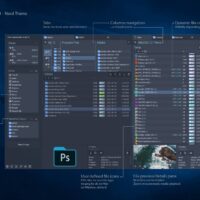
If you spend your day moving large media archives, ISO images, or nested project folders across drives, the default Windows File Explorer quickly becomes a bottleneck. One Commander V3 is a modern, GPU-accelerated file manager built specifically for Windows 10 and Windows 11 that turns deep directory traversal into a fast, predictable workflow.
Upgrade Windows 11 file management with One Commander V3. Explore Miller columns, dual-pane tabs, instant Spacebar previews, and batch renaming in our 2026 review.
Core Architecture & Standout Features
| Subsystem | Capability | Workflow Impact |
|---|---|---|
| Miller Columns & Dual-Pane | Side-by-side hierarchical folder columns plus classic dual-pane split views and workspace tabs. | Navigate 5+ nested subdirectories without losing parent context or opening multiple windows. |
| Built-In QuickLook Preview | Press Spacebar to inspect images, videos, audio tracks, PDFs, Markdown, and source code. | Zero external viewer launch latency when auditing downloads or asset folders. |
| Visual Directory Telemetry | Inline relative file-size bars, folder age indicators, and color-coded file type tags. | Spot space hogs and recently modified builds at a glance without launching a separate scanner. |
| Batch Renamer & Regex Engine | Multi-rule find/replace, numbering sequences, EXIF/metadata tokens, and live preview before commit. | Clean up camera dumps, audio crates, and firmware releases in seconds. |
| Non-Blocking Task Queue | Queued copy/move operations with pause/resume, collision handling, and automated task scheduling. | Prevents I/O thrashing when transferring multiple batches across NVMe and network shares. |
Free vs. Pro License Breakdown
Unlike subscription-locked utilities, One Commander offers a generous free tier for personal home use alongside a one-time Pro upgrade for commercial environments and advanced automation:
- Free Edition (Home Use): Includes Miller columns, dual-pane mode, tabs, QuickLook previews, dark/light themes, and core batch renaming with zero ads or telemetry bloat.
- Pro Edition (One-Time License): Unlocks commercial usage rights, advanced task automation/scripting hooks, custom column layouts, and priority feature updates.
Recommended Power-User Setup
- Enable Dark Theme & Compact Density: Open Settings → Appearance and switch to the dark slate palette with compact row spacing to maximize vertical directory visibility.
- Bind QuickLook to Spacebar: Verify Preview on Spacebar is active so you can scrub through audio stems, configs, and screenshots inline.
- Pin Frequent Roots to Favorites: Group your active working drives, seedbox mounts, and local repositories into color-coded workspace tabs for one-click switching.
VERIFIED UTILITY // WINDOWS 10 & 11
ONE COMMANDER V3 (INSTALLER & PORTABLE)