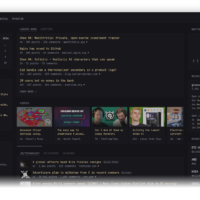

A sub-20MB Go binary and Docker container that consolidates Docker service health, system stats, RSS feeds, GitHub releases, and bookmarks into a sub-second dark-mode command center.
Running a modern self-hosted stack—whether on a local home server, a Windows Docker Desktop host, or a remote seedbox—quickly turns into tab overload. Between checking container health on Navidrome, Jellyfin, and Nextcloud AIO, tracking GitHub release tags, and scanning daily tech feeds, heavy JavaScript dashboards often consume more RAM than the services they monitor.
Glance (glanceapp/glance) takes the opposite approach. Written in Go with minimal vanilla JavaScript and zero bloated database dependencies, it compiles down to a single binary under 20MB that renders uncached pages in roughly one second while idling at a handful of megabytes of RAM.
Discover Glance, the <20MB Go-powered self-hosted dashboard that unifies Docker container monitoring, server telemetry, RSS feeds, and bookmarks in one dark-mode interface.
Core Architecture & Standout Features
Unlike traditional homelab dashboards that only display static bookmark tiles, Glance acts as both an infrastructure status monitor and a real-time information aggregator:
- Declarative YAML Configuration: Every page, column width, widget, and custom CSS override lives in clean, version-controllable YAML files (
glance.yml), complete with$includemodular support so you can split large setups cleanly. - Native Docker & Host Telemetry: Built-in widgets read container states directly from the Docker socket alongside live CPU, memory, disk usage, and uptime metrics without needing Prometheus or Grafana overhead.
- Zero Background Polling Bloat: Glance only fetches fresh feed and API data when you load or refresh the dashboard, caching results per widget interval to keep network and CPU overhead near zero.
- Extensible Custom & API Widgets: Beyond built-in RSS, Reddit, Hacker News, YouTube, weather, and GitHub release trackers, you can query any JSON endpoint with the
custom-apiwidget and render it using Go HTML templates. - Built-In Authentication & Reverse Proxy Ready: Supports native password-hashed login protection and
proxied: trueheaders for clean deployment behind NGINX, Caddy, or Traefik.
Technical Specifications & Comparison
| Metric / Feature | Glance Dashboard | Heavy JS Dashboards (Homarr / Dashy) |
|---|---|---|
| Runtime Footprint | < 20MB Binary / ~15–30MB RAM | 150MB – 500MB+ RAM (Node.js) |
| Configuration Format | Declarative YAML + Custom CSS | Web UI JSON / YAML Exports |
| Live Feed Aggregation | Native RSS, GitHub, Reddit, YT, HN | Limited or Requires External Widgets |
| Docker Socket Integration | Built-in Container Status & Links | Built-in via Docker Socket |
| Deployment Options | Docker Compose, Linux/Windows/macOS Binary | Docker Only |
Deploying Glance with Docker Compose
Spinning up Glance takes under two minutes. Create a project directory with a config subfolder, drop in your docker-compose.yml, and map the Docker socket read-only if you want live container status tiles:
services:
  glance:
    image: glanceapp/glance:latest
    container_name: glance
    restart: unless-stopped
    ports:
      - "8080:8080"
    volumes:
      - ./config:/app/config
      - /var/run/docker.sock:/var/run/docker.sock:ro
    environment:
      - TZ=Europe/London
Next, create config/glance.yml with a dark cyber-slate palette and a multi-column layout combining Docker container monitoring, system stats, and RSS feeds:
theme:
  background-color: 222 47 7
  primary-color: 199 89 48
  contrast-multiplier: 1.15

pages:
  - name: Lab Command
    columns:
      - size: small
        widgets:
          - type: clock
            hour-format: 24h
          - type: server-stats
            servers:
              - type: local
                name: Primary Node
      - size: full
        widgets:
          - type: docker-containers
            hide-by-default: false
          - type: rss
            limit: 8
            feeds:
              - url: https://lanparty.tech/feed/
                title: LANPARTY.TECH
Launch the stack with docker compose up -d and open http://localhost:8080—your entire homelab status and feed stream loads instantaneously.